Claim big jobs in stages, added up for you
Turn an accepted quote into progress claims by percentage, by section or for the balance. Add variations as the job changes. WhizInvoice keeps the running total, takes off the deposit and makes sure nothing is claimed twice.
The whole contract on one strip
Every accepted quote and its job show Contract, Claimed, Paid and Left to claim, with the deposit, claims, variations and on site changes listed under them.
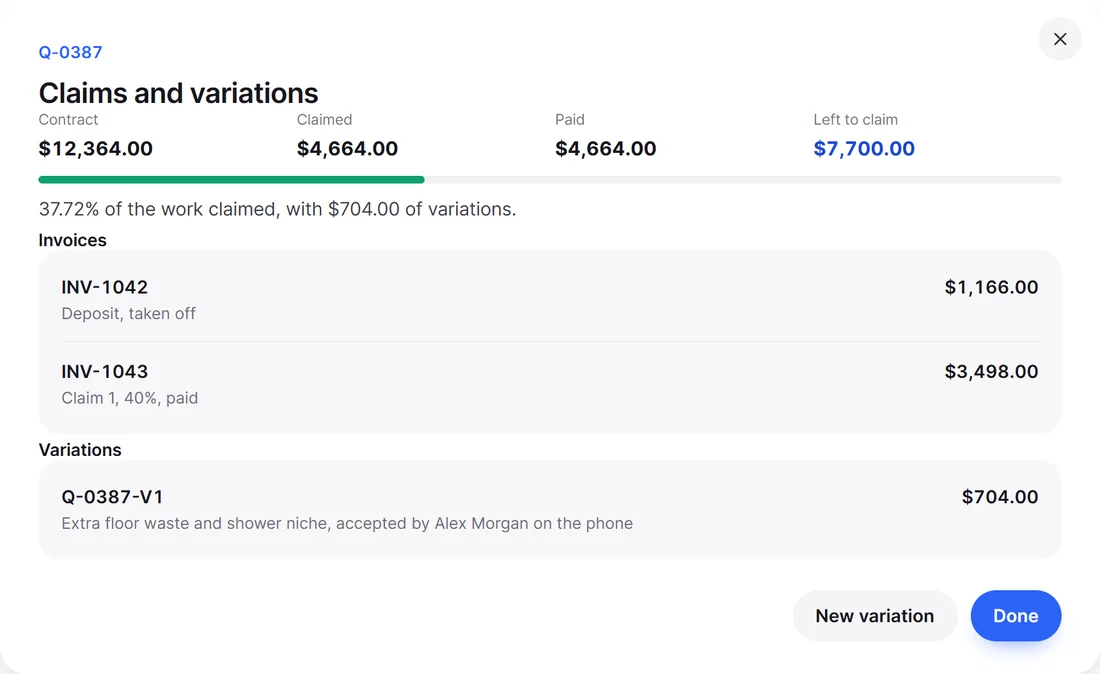
From accepted quote to final claim
Choose how much to claim
Pick Invoice part on the accepted quote: a percentage of the contract, chosen parts such as each section of the quote or each accepted variation, or the balance.
See it before you make it
The preview updates as you type, then Make claim makes a normal invoice titled with the claim number and the quote, showing what is claimed now and claimed so far.
The deposit comes off
A deposit comes off the first claim, and whatever is left of it comes off the next one. The balance claim has no deposit line.
Close it to the cent
The claim that finishes the quote takes up any tax rounding, so your claims add up to the contract exactly.
See the claim before you make it
Choose A percentage, Chosen parts or The balance. The preview shows each part and what is claimed so far.

Example: a home extension
- Quote Q-0012, accepted
- $44,000.00 including GST
- Deposit invoice, 10%
- $4,400.00
- Claim 1, 30% of the quote
- $13,200.00, less deposit $4,400.00, to pay $8,800.00
- Variation Q-0012-V1, accepted online
- $2,200.00, contract now $46,200.00
- Claim 2, 40% of the quote plus the variation
- $19,800.00
- Invoice the balance
- $13,200.00, left to claim $0.00
Example figures for a fictional job, with GST at 10%.
Variations written in the office
When the job changes, the paperwork keeps up.
Numbered from the quote
New variation makes Q-0012-V1, then V2, written in the normal editor with your price list and kits.
Signed online or marked accepted
The customer signs it from a link, or press Mark accepted for a yes on the phone. Declined ones stay listed and add nothing.
On site changes count too
A signed Change to the job form from the phone goes into the contract total with everything else.
Numbers you can trust
- Nothing claimed twice. Claimed is always added up from the live claims, less any credit notes on them.
- Credit notes give it back. Credit a claim line and that amount can be claimed again in the balance.
- The same figures everywhere. Work in progress in Reports, the data download and the year end pack for your accountant all come from the one ledger.
- Works with your books. Claims are normal invoices, so they sync to Xero or QuickBooks Online like any other invoice.
Good to know
Which plans include progress claims?
Starter and up, along with variations. Starter is US$7.99 a month or US$59.88 a year, with a 14 day free trial.
How is the deposit handled?
It comes off the first claim as far as that claim reaches, and any rest comes off the next. Once a claim has taken a deposit off, that deposit invoice cannot be voided or deleted, and WhizInvoice tells you which claim is using it.
Can I claim part of a variation?
Yes. Choose chosen parts when you make the claim, and take a variation or a section whole or at a percentage.
Does my customer have to sign variations online?
No. They can sign from the link, or you can press Mark accepted when they say yes on the phone.
What happens if I credit a claim?
An issued credit note lowers Claimed and returns that much to the part it came from, so the balance can claim it again.
Run your next big job by claims
Try it on a real quote with a 14 day free trial of Starter.
Free plan forever. No card needed to start.